Rayman Legends
Rayman, named platformer of the year and winner of multiple artistic
and musical achievements, is back with a brand new
adventure: Rayman® Legends
Rayman® Legends: Definitive Edition contains the acclaimed game Rayman® Legends as well as new exclusive content!
Game Overview
The Glade of Dreams is in trouble once again!
Rayman, Globox, and the Teensies are off wandering through an enchanted forest when they discover a mysterious tent filled with a series of captivating paintings. As they look more closely, they notice each painting seems to tell the story of a mythical world. While focusing on a painting that shows a medieval land, they are suddenly sucked into the painting, entering the world, and the adventure begins. The gang must run, jump and fight their way through each world to save the day and discover the secrets of every legendary painting.
Four-Player Co-op
Michel Ancel, celebrated creator of Rayman, Beyond Good & Evil and the Raving Rabbids is bringing his innovative creativity Rayman Legends. Once again you and 3 friends can save the Glade of Dreams in offline co-op. Jump in and jump out at any time during the 80+ levels of gameplay!
3D Boss Battles
The bosses have a big advantage over Rayman’s gang... an extra dimension! Dragons and other epic creatures can attack from all angles, so you’ll have to be on top of your game to defeat them
Touch Gameplay
Rayman® Legends takes full advantage of the Nintendo Switch and its new controllers’ capabilities. Undock your Switch device and use the touch screen to take out enemies, manipulate platforms, cut ropes to clear a path and much more. With the gyroscope technology, you can move rotating platform and there are many more surprises to come!
Rayman Rocks!
See if you have what it takes to be a Platforming Hero – jump to the beat of a drum, punch to the bass line, even zip-line during a guitar sustain. Timing and rhythm are the key to completing these maps set to music.
Media
1 / 1
Rayman Legends / Definitive Edition
Rayman, Globox, and the Teensies are off wandering through an enchanted forest when they discover a mysterious tent filled with a series of captivating paintings. As they look more closely, they notice each painting seems to tell the story of a mythical world. While focusing on a painting that shows a medieval land, they are suddenly sucked into the painting, entering the world, and the adventure begins. The gang must run, jump and fight their way through each world to save the day and discover the secrets of every legendary painting.
Release Date:
08/29/2013 / 12/09/2017
Genre:
Platformer / Action / Adventure
Developer:
Ubisoft Montpellier, Pastagames
Platforms:
PC / PlayStation 3 / PlayStation 4 / Wii U / Xbox 360 / Xbox One / Nintendo Switch
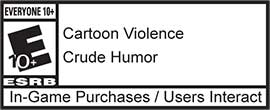
Rayman Legends / Definitive edition is rated
2017 Ubisoft Entertainment. All Rights Reserved. Rayman, , Rayman Legends, the character of Rayman, Ubisoft and the Ubisoft logo are trademarks of Ubisoft Entertainment in the U.S. and/or other countries.
Nintendo trademarks and copyrights are properties of Nintendo. Wii U is a trademark of Nintendo. © 2013